

Old SAM4S Cash Register Replacement Guide
Compare replacement options for older SAM4S and Samsung ER, SPS, SER and NR cash registers. Find the best current direction based on your keyboard style, business type, item count, printers, scanners, payment workflow and reporting needs.
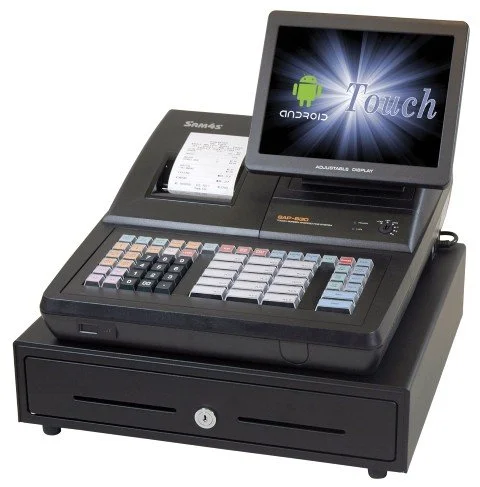
What Replaces an Older SAM4S Cash Register?
There is rarely one exact replacement for an older SAM4S or Samsung register. The best current match depends on whether the business needs a basic cash register, a raised-key retail register, a flat-key restaurant register, a hybrid touchscreen terminal or a full POS system. Start by matching the workflow and features you actually use today.
What Type of Replacement Do You Need?
The model number is important, but the way the register is used is often a better guide. Choose the path that most closely matches your current checkout operation.
Basic Register Replacement
Best for simple cash, card, tax, receipt and department sales with limited item programming.
- Small businesses
- Simple department sales
- Basic receipt printing
- Easy employee training
Start with current entry-level SAM4S ECR options such as the ER-180, ER-260EJ or ER-265EJ.
Compare current cash registersRaised-Key Retail Replacement
Best for liquor, convenience, grocery, tobacco, thrift and specialty stores that use physical item or department keys.
- Raised keyboard
- PLUs and departments
- Barcode scanning on some setups
- Fast retail item entry
Start with models such as the ER-915E, ER-920E, ER-925E, ER-940E, NR-510RB-E or SAP-630II RT.
View retail cash registersFlat-Key or Touchscreen Replacement
Best for restaurants, bars, delis, food trucks, cafeterias and other menu-driven businesses.
- Flat keyboard or touchscreen
- Menu keys and modifiers
- Kitchen printing
- Guest checks or open tabs
Start with the SPS-300 family, NR-510B-E, SAP-630II FT or SAM4POS.
View restaurant cash registersDo You Want the New System to Work Like the Old One?
A familiar replacement can reduce training and simplify the transition. However, replacing an older register is also an opportunity to improve reporting, programming, payment handling, item management or inventory. Decide whether you want a close operational match or a broader upgrade.
Modern SAM4S Replacement Categories
Most replacement projects fall into one of three categories: a current electronic cash register, a hybrid register-style touchscreen terminal or a software-driven POS system.
| Replacement Category | Best Fit | Why Merchants Choose It | What to Confirm |
|---|---|---|---|
| Current SAM4S electronic cash register | Small retail, liquor, convenience, smoke shops, food trucks, cafeterias and simple checkout | Familiar workflow, physical keys, built-in receipt printing, cash-drawer control and lower complexity | Keyboard style, PLU capacity, departments, taxes, scanner support, scale support, receipt wording and payment workflow |
| SAP-630II hybrid terminal | Businesses that prefer a register-style keyboard but want a touchscreen and more modern platform | Touch operation, large keyboard, built-in printer, customer display and cash drawer | Flat versus raised keyboard, software setup, reporting needs, payment workflow and business type |
| SAM4POS touchscreen system | Restaurants, retail stores and businesses needing more flexible software-driven checkout | More modern workflow, stronger item management, employee controls, reporting and expansion options | Software fit, processor compatibility, peripherals, support requirements and ongoing costs |
| Full retail inventory POS | Businesses needing purchasing, receiving, detailed inventory, customer accounts or multi-location management | More complete operational control than a traditional cash register or simple checkout system | Inventory workflow, vendor management, data conversion, integrations, hardware and implementation support |
SAP-630II for Register-Style Operation
The SAP-630II combines a touchscreen, large programmable keyboard, built-in receipt printer, customer display and cash drawer in a register-style format. It can be a practical direction for businesses replacing an older advanced ECR or SPS-500-style system.
- Raised-key and flat-key versions
- Touchscreen operation
- Built-in thermal receipt printer
- Integrated customer display
- Cash drawer included in common configurations
- Ports for compatible peripherals

Old SAM4S Model to Current Replacement Direction
Use this chart as a starting point. Replacement recommendations must be confirmed when the old register uses scanners, scales, kitchen printers, payment equipment, custom keyboard layouts or specialized reports.
| Older Model | Common Original Use | Recommended Direction | Why This Direction Makes Sense |
|---|---|---|---|
| ER-180 or ER-180U | Very small business, cash sales and basic departments | ER-180, ER-260EJ or ER-265EJ | Appropriate when the business only needs simple checkout, receipts, tax and basic reporting |
| ER-260 or ER-265 | Small retail, food counter and basic department sales | ER-260EJ or ER-265EJ | Maintains a simple register workflow while moving to a newer SAM4S model family |
| ER-380 or ER-390 | Retail stores, departments, PLUs and small-business checkout | ER-915E, ER-920E or ER-925E | A practical direction for businesses needing more capability than an entry-level register |
| ER-5200M | Food service, restaurant counters and flat-key operation | NR-510B-E, SPS-320, SPS-340, SPS-345, SAP-630II FT or SAM4POS | The right choice depends on menu keys, modifiers, kitchen printing, guest checks and whether the business wants POS software |
| ER-5215M | Retail, liquor, convenience and raised-key operation | ER-915E, ER-920E, ER-925E, ER-940E, NR-510RB-E or SAP-630II RT | A raised-key replacement preserves the familiar retail checkout workflow |
| ER-5240M | Retail, liquor, convenience and grocery-style checkout | ER-920E, ER-925E, ER-940E, NR-510RB-E or SAP-630II RT | These options better suit stores that need more keys, departments, PLUs and daily commercial use |
| ER-650 or ER-650R | Higher-end retail or hospitality register | ER-940E, NR-510RB-E, SAP-630II or SAM4POS | Replacement should be based on the advanced functions actually used rather than the model number alone |
| ER-900 Series | Retail, liquor, convenience, grocery and food counters | ER-915E, ER-920E, ER-925E, ER-940E, NR-510 or SAP-630II | Staying with an ER, NR or hybrid register is often the cleanest path for merchants who prefer traditional operation |
| SPS-2000 or SPS-2200 | Older restaurant and hospitality POS-style use | SAP-630II, SAM4POS or a current SPS-300 model | These systems may require a more advanced replacement than a basic cash register |
| SPS-300 Series | Restaurants, food service, programmable keys and kitchen printing | SPS-320, SPS-340, SPS-345, SAP-630II FT or SAM4POS | A strong direction for businesses wanting restaurant-style operation without necessarily moving to full POS |
| SPS-500 Series | Hybrid ECR/POS use in restaurants, bars, retail and advanced register environments | SAP-630II FT or RT, SAM4POS, or a full POS system | The SPS-500 combined touchscreen operation, programmable keys, printing and advanced register functions. A basic cash register may not replace all of those capabilities. |
| NR-500 or NR-510 Series | Retail or restaurant use with flat or raised keyboards | NR-510B-E flat keyboard or NR-510RB-E raised keyboard | The current NR direction should match the keyboard style and workflow employees already use |
| SER-7000 | Advanced retail or hospitality register system | SAM4POS, SAP-630II, or a current ER or NR model | Some businesses will need POS features while others only need dependable checkout |
| Older Samsung-branded register | Retail, restaurant, convenience and small-business checkout | SAM4S cash register, SAP-630II or SAM4POS | SAM4S is often the most natural direction for businesses that want a familiar operating style |
Replacing an SPS-500?
Review the complete SAM4S SPS-500 manual, programming and replacement guide before selecting a replacement. The correct direction depends on whether the old system was used primarily as a restaurant register, retail register or POS-style workstation.
Raised Keyboard, Flat Keyboard or Touchscreen?
Keyboard style is one of the most important replacement decisions. The wrong interface can slow employees down even when the new system has the right features.
Choose a Raised Keyboard When
- You operate a liquor, convenience, grocery or retail store
- Cashiers use physical department or item keys
- Common items are entered quickly by key
- You want a familiar retail workflow
- You prefer tactile keys over screen-only operation
Choose a Flat Keyboard When
- You operate a restaurant, deli, cafeteria or food truck
- The old register uses a flat menu overlay
- You need many preset food or drink buttons
- You need modifier and menu-key access
- You prefer a spill-resistant surface
Choose Touch or Hybrid When
- You want a modern screen-driven checkout process
- You are replacing an SPS-500-style system
- You want touch operation with physical shortcut keys
- You need more flexible programming and reporting
- The old register is being pushed beyond simple checkout
SAP-630II FT Versus SAP-630II RT
The main difference is the keyboard style. Select the version that best matches the way employees ring sales.
SAP-630II FT
The flat-key version is generally the better direction for restaurants and menu-driven food service.
- Flat programmable keyboard
- Menu-driven item entry
- Food and beverage buttons
- Modifier-oriented workflows
- Restaurants, cafeterias and concessions
SAP-630II RT
The raised-key version is generally the better direction for retail, liquor, convenience, tobacco, thrift and grocery checkout.
- Raised physical keys
- Retail department and item entry
- Familiar register-style operation
- Touchscreen plus shortcut keys
- Retail and counter-service applications
SAM4S Replacement Options by Business Type
| Business Type | Typical Old Register Style | Recommended Direction | Important Requirements |
|---|---|---|---|
| Liquor store | Raised keys, departments, PLUs and scanner on some setups | ER-920E, ER-925E, ER-940E, NR-510RB-E, SAP-630II RT or SAM4POS | Scanner support, age-restricted workflow, department layout, reports and payment setup |
| Convenience store | Raised keys, PLUs, scanner and possible scale use | ER-925E, ER-940E, NR-510RB-E, SAP-630II RT or SAM4POS | Item count, scanner needs, non-tax items, scale use and payment workflow |
| Small grocery store | Raised keys, scanner and scale on some setups | ER-940E, NR-510RB-E, SAP-630II RT or SAM4POS | Scale support, scanner support, taxable and non-taxable items, PLU capacity and reports |
| Deli or food counter | Flat keys, menu buttons and kitchen printer on some setups | SPS-320, SPS-340, SPS-345, NR-510B-E, SAP-630II FT or SAM4POS | Menu layout, modifiers, kitchen printing, open checks and speed of service |
| Restaurant or bar | Flat keys, menu programming, modifiers and guest checks | SPS-300 Series, SAP-630II FT or SAM4POS | Open tabs, tips, modifiers, kitchen printing, reporting and whether a full POS is needed |
| Church, school or nonprofit | Basic register or flat-key menu register | ER-180, ER-260EJ, ER-265EJ, SPS-320 or NR-510B-E | Simple training, volunteer operation, easy reports and low complexity |
| Retail store | Raised keys, departments, PLUs and receipt printer | ER-915E, ER-920E, ER-925E, ER-940E, NR-510RB-E or SAM4POS | Department count, item count, scanner use, clerk reports and end-of-day closeout |
| Thrift store | Departments, discounts and simple reporting | ER-920E, ER-925E, NR-510RB-E, SAP-630II RT or SAM4POS | Donation categories, departments, discounts, clerk tracking and receipts |
| Food truck | Compact flat-key or simple menu register | ER-260EJ, ER-265EJ, SPS-320, NR-510B-E, SAP-630II FT or SAM4POS | Counter space, power, payment workflow, receipt needs and menu complexity |
Stay With a Cash Register or Move Up to POS?
Stay With a Cash Register When
- You mainly ring simple sales
- You use departments or basic PLUs
- You do not need detailed inventory
- You do not need customer accounts or loyalty
- You want simple cashier training
- You prefer fewer software features to manage
- You want a familiar closeout process
Move Up to SAM4POS When
- You need stronger item or menu management
- You want better reporting
- You need more employee controls
- You need restaurant or retail flexibility
- You want touchscreen operation
- You need room to add stations or peripherals
- You are outgrowing an older advanced register
When a Full Retail POS Is the Better Direction
Businesses that need purchasing, receiving, vendor management, detailed inventory, customer accounts, multi-location control or more advanced retail reporting should also compare BizTracker Infinity retail POS .
Payment Terminal, Cash Discount and Surcharge Considerations
Replacing an old register often exposes payment-workflow questions. A separate credit card terminal may still work well, but the register and terminal may not share payment data automatically.
- Will you keep a separate credit card terminal?
- Does the register need to show a cash discount or card-related charge?
- Can the payment terminal distinguish credit, debit and prepaid cards?
- Does the receipt need separate lines for fees, tips or gratuity?
- Do employees need a clear cash-versus-card procedure?
- Do menus, signs or receipts need updated disclosure language?
A New Register Does Not Automatically Make a Payment Program Compatible
Cash discount, surcharge, dual-pricing, service-charge and gratuity programs may depend on processor rules, card type, terminal capability, receipt wording and customer disclosure. Confirm the complete payment setup before programming or ordering equipment.
Repair, Reprogram or Replace?
Not every older register needs to be replaced. A reliable register with a simple workflow may only need programming, supplies, training or a minor hardware repair.
Repair or Reprogram When
- The register remains reliable
- The business workflow is simple
- The problem is limited to programming
- Employees already know the keyboard
- Replacement parts remain practical to obtain
- The receipt and reporting still meet your needs
- The repair cost is reasonable
Replace When
- Parts or support are becoming difficult to obtain
- The printer, display or keyboard repeatedly fails
- The receipt format cannot meet current needs
- The business needs more PLUs or functions
- The payment workflow has changed
- Programming has become difficult to maintain
- The cost of continued support no longer makes sense
Signs It May Be Time to Replace the Register
Printer Problems
Frequent jams, fading receipts, poor print quality or an unreliable built-in printer can make replacement more practical than repeated repair.
Keyboard Problems
Worn keys, dead buttons, missing keycaps or damaged flat-key overlays can slow employees and interrupt checkout.
Display Problems
Weak operator or customer displays make it difficult to verify prices, totals and change due.
Programming Limits
A newer system may be needed when item counts, departments, tax requirements or reporting needs exceed the old register.
Information That Helps Us Recommend a Replacement
Model Number
Look on the front, side, back or underside of the register. Examples include ER-5200M, ER-5240M, ER-650, ER-900, SPS-345, SPS-530 or NR-510.
Keyboard Type
Tell us whether the register uses raised keys, a flat keyboard sheet or a touchscreen-style interface.
Business Type
A liquor store, deli, restaurant, thrift store, school cafeteria and convenience store can require very different replacement systems.
Connected Hardware
List scanners, scales, kitchen printers, remote printers, customer displays, cash drawers and payment terminals.
Programming Needs
Note departments, PLUs, tax rates, clerks, discounts, food keys, tender keys, receipt wording and reports.
Upgrade Goals
Tell us whether you want the new system to work like the old one or whether you want improved reporting, easier programming or POS features.
Photos Make Replacement Recommendations Easier
Include a clear photo of the keyboard, the complete model label, a recent receipt and the connected cables or peripherals. This helps identify the current workflow and avoid recommending an incompatible replacement.
Related SAM4S Direct Guides
Old SAM4S Register Replacement FAQ
What replaced my older SAM4S register?
There may not be a single exact replacement. The right current model depends on the keyboard style, departments, PLUs, receipt needs, scanner use, scale use, printer setup, payment workflow and reports.
Should I replace my old register with another cash register or a POS system?
A current cash register may still be the right fit for simple checkout. A POS system may be better when you need detailed inventory, customer accounts, integrated payments, kitchen routing, advanced reporting or easier multi-station management.
Is a raised keyboard or flat keyboard better?
Raised keyboards are often preferred for retail, convenience, liquor and department-driven checkout. Flat keyboards are often preferred for restaurants, bars, food trucks and menu-driven operations.
Can I keep my current credit card terminal?
A separate terminal can often continue to be used when it comes from the processor and the checkout procedure remains acceptable. Integrated payments, surcharge, cash discount, dual pricing, tips and service charges require additional compatibility review.
Can my old cash register be reprogrammed instead of replaced?
Possibly. Reprogramming may be enough when the register remains reliable and the business only needs minor changes. Replacement makes more sense when parts, support, reporting, receipt limitations or payment requirements have outgrown the old system.
What should replace an SPS-500?
An SPS-500 replacement should usually preserve its touchscreen, keyboard, printer and advanced workflow. Common directions include the SAP-630II FT or RT, SAM4POS or a full POS system depending on the business type and features used.
Is the SAP-630II a cash register or POS system?
The SAP-630II is best viewed as a hybrid register-style touchscreen terminal. It combines a programmable keyboard, built-in printer, customer display, cash drawer and touchscreen operation.
Can SAM4S Direct help choose the correct replacement?
Yes. Provide the model number, keyboard photo, receipt sample, business type, connected hardware and payment requirements so the replacement can be reviewed accurately.
Need Help Replacing an Older SAM4S Register?
Send us the current model number, a clear keyboard photo, a recent receipt and a description of how the business rings sales. We can help compare a current cash register, SAP-630II hybrid terminal, SAM4POS system or full retail POS direction.
Last reviewed July 2026. Product availability, software support, programming options, processor compatibility and accessory compatibility may vary. Confirm the complete replacement configuration before ordering.