

SAM4S SAP-630II Premium Hybrid POS Terminal
The SAM4S SAP-630II is a premium hybrid ECR-style POS terminal for businesses that like the speed of a cash register keyboard but want a more modern touchscreen POS platform.
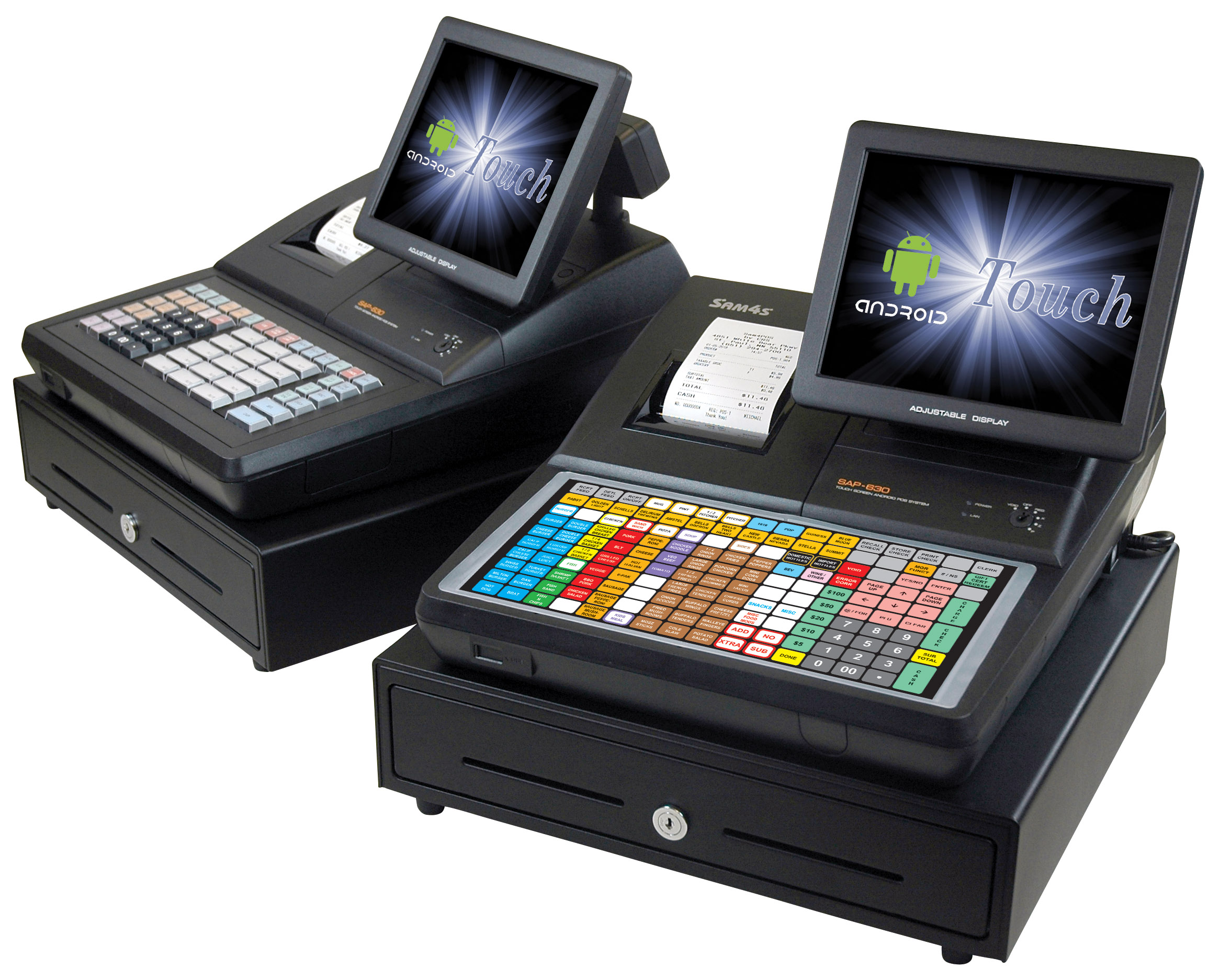
It combines a 9.7-inch touchscreen, large programmable keyboard, built-in receipt printer, customer display and commercial cash drawer into one all-in-one checkout station.
A Premium Step Above a Basic Cash Register
The SAP-630II is not a basic entry-level cash register. It is a hybrid POS terminal designed for merchants who need fast item entry, a familiar keyboard layout, receipt printing, a cash drawer and POS software flexibility in one compact workstation.
This makes it a strong option for businesses that are outgrowing a traditional register but do not want a loose collection of separate POS hardware pieces on the counter.
Best Fit Businesses
The SAP-630II is built for businesses that want a more complete checkout station than a simple register, especially where speed, durability and counter efficiency matter.
Food Service
- Cafeterias
- Food courts
- Quick service restaurants
- Bars
- Coffee shops
- Ice cream and yogurt shops
Retail
- Thrift stores
- Convenience stores
- Liquor stores
- Tobacco stores
- Garden centers
- Retail scanning counters
Specialty Counters
- Delicatessens
- Bakery counters
- Concession stands
- Dry cleaners
- Hospitality counters
- Food and drug stores
Why It Is a Premium SAM4S Option
The SAP-630II is designed to feel familiar to cash register users while adding POS terminal features. Instead of choosing between a traditional register and a touchscreen system, the SAP-630II gives you both: physical shortcut keys for speed and a color touchscreen for POS software operation.
Touchscreen Control
A 9.7-inch adjustable color touchscreen gives the operator a modern interface for POS functions, menus and software-driven workflows.
Keyboard Speed
Choose raised keys or a flat spill-resistant keyboard for fast access to popular items, departments, tenders and daily register functions.
Built-In Workstation
The printer, cash drawer and customer display are built into the workstation, helping keep the checkout counter cleaner and more organized.
SAP-630II RT vs SAP-630II FT
The SAP-630II Series is available in two main keyboard styles. The right choice depends on how your staff rings sales and what type of business you operate.
| Model | Keyboard Style | Best Fit | Why Choose It |
|---|---|---|---|
| SAP-630II RT | Raised-key keyboard | Retail, liquor, tobacco, convenience and general counter sales | Traditional key feel, fast department and tender entry, familiar register-style operation |
| SAP-630II FT | Flat spill-resistant keyboard | Food service, cafeterias, concessions, quick service and environments with spills | Large programmable surface, easier cleaning and more protection in busy food-service areas |
Included Workstation Components
One of the biggest advantages of the SAP-630II is that the major checkout components are built into one commercial terminal instead of being added separately.
Front Counter Hardware
- 9.7-inch TFT-LCD color touchscreen
- Raised-key or flat spill-resistant keyboard options
- Integrated 80mm direct thermal receipt printer
- Commercial cash drawer with lock and media slots
- Rear pop-up customer display
- Optional integrated magnetic card reader depending on configuration
Connectivity
- Four serial ports for supported peripherals
- Two USB 2.0 ports with one front and one rear
- Ethernet LAN connection
- Three 24V cash drawer connections
- SDHC-compatible SD card support
- Optional Wi-Fi and Bluetooth combo module
Common Peripheral Options
The SAP-630II is designed for businesses that may need more than a simple cash drawer and receipt printer. Its ports can support a more complete counter setup when paired with compatible hardware and software.
Retail Add-Ons
- Barcode scanner
- Customer display
- Payment terminal
- Scale where supported
- Cash drawer expansion
Food Service Add-Ons
- Kitchen printer
- Remote printer routing
- Order prep printing
- Employee login tools
- Payment terminal
Management Tools
- SD card utilities
- Program save and load
- Report or screen capture support
- Firmware and graphics utility support
- USB keyboard or USB drive support where configured
SAP-630II Specifications
Specifications can vary by configuration, software and availability, but the SAP-630II Series is built as a commercial all-in-one POS terminal.
| Feature | SAP-630II Series |
|---|---|
| Platform | Hybrid ECR-style open architecture POS terminal |
| Operating System | Android 6.0 Marshmallow |
| Processor | Intel Braswell Celeron N3160 |
| Display | 9.7-inch TFT-LCD touchscreen, 1024 x 768 resolution |
| Touch Panel | 5-wire resistive touch |
| Keyboard | Flat keyboard with 160 programmable locations or raised keyboard with up to 90 programmable locations |
| Printer | 80mm direct thermal drop-and-print receipt printer |
| Printer Speed | 100mm per second |
| Customer Display | Pop-up turret, 2 lines by 16 characters |
| Memory | 2GB DDR3 RAM and 64GB eMMC flash |
| Network | RJ45 10/100 Base-T Ethernet |
| Wireless | Optional Wi-Fi and Bluetooth combo module |
| Cash Drawer | 5 bill, 5 or 6 coin insert with lock and two media slots |
| Approximate Unit Size | 16-1/2 inches wide x 15-3/4 inches deep x 14-1/8 inches high |
| Approximate Weight | 32.7 lbs |
When the SAP-630II Makes Sense
The SAP-630II is best for merchants who want a serious counter terminal with a register-style workflow. It is especially useful when employees benefit from physical keys for common items but management wants a more modern POS software platform than a basic ECR.
Good Fit If You Want:
- A premium all-in-one checkout station
- Physical shortcut keys plus touchscreen operation
- A built-in receipt printer and cash drawer
- A customer-facing price and total display
- Retail or food-service flexibility
- A cleaner counter than separate POS components
Compare Other Options If You Need:
- Cloud-first POS management
- Online ordering
- Advanced restaurant table service features
- Deep inventory management
- Multi-location reporting
- The newest Android operating system environment
SAP-630II vs Traditional SAM4S Cash Register
The SAP-630II sits between a classic SAM4S cash register and a full modern POS system. That is why it is a good premium option for some merchants, but not the right answer for every business.
| Option | Best For | Strength | Trade-Off |
|---|---|---|---|
| Traditional SAM4S Cash Register | Simple retail or counter sales | Reliable, familiar and cost-effective | Less flexible than a POS terminal |
| SAM4S SAP-630II | Premium hybrid checkout with keys and touchscreen | Combines register speed with POS terminal features | Software and payment experience depend on configuration |
| SAM4POS | Businesses wanting a modern POS platform | More POS-focused workflow and reporting | Bigger workflow change from a basic register |
Downloads and Technical Information
Use the brochure for product overview and general specifications. The service manual is intended for technical service reference and should be used by qualified technicians.
SAP-630II Brochure
Review the product overview, applications, hardware components, connectivity and specifications.
View BrochureSAP-630II Service Manual
Technical reference for service, diagnostics and qualified repair use. Contact SAM4S Direct before attempting service work on business-critical checkout equipment.
View Service ManualIs the SAP-630II Right for Your Business?
Tell us what type of business you operate, what register or POS system you use now, whether you need raised keys or a flat keyboard, and whether you need integrated payments, scanning, kitchen printing or cloud reporting. We can help you decide if the SAP-630II, a SAM4S cash register or SAM4POS is the better path.
Related SAM4S Pages
Frequently Asked Questions
What is the SAM4S SAP-630II?
The SAP-630II is a hybrid ECR-style open architecture POS terminal. It combines a touchscreen, programmable keyboard, receipt printer, cash drawer and customer display into one premium SAM4S checkout terminal.
Is the SAP-630II a cash register or a POS system?
It is best described as a hybrid. It has the familiar keyboard and built-in hardware of a cash register, but it is built as an Android POS terminal that can run compatible POS application software.
What is the difference between SAP-630II RT and SAP-630II FT?
The SAP-630II RT uses a raised-key keyboard. The SAP-630II FT uses a flat spill-resistant keyboard. Raised keys are often preferred for traditional retail-style entry, while flat keyboards are popular in food service and spill-prone environments.
Does the SAP-630II include a receipt printer?
Yes. The SAP-630II includes an integrated 80mm direct thermal receipt printer with drop-and-print paper loading.
Does the SAP-630II include a cash drawer?
Yes. The SAP-630II includes a commercial cash drawer with a bill and coin insert, lock and media slots.
Can the SAP-630II connect to scanners, printers or payment terminals?
The SAP-630II includes multiple serial ports, USB ports and Ethernet connectivity for supported peripherals. Actual compatibility depends on the software, payment processor and hardware configuration.
Is the SAP-630II right for restaurants?
It can be a good fit for cafeterias, quick service, concessions, bars, food courts and other food-service counters. For more advanced restaurant needs, compare it with SAM4POS or another full restaurant POS option.
Is the SAP-630II right for retail stores?
Yes. It can be a strong fit for convenience stores, liquor stores, tobacco stores, thrift stores, garden centers and other retail counters that want a premium hybrid terminal with keyboard speed and touchscreen flexibility.
Should I choose SAP-630II or SAM4POS?
Choose the SAP-630II if you want a premium all-in-one hybrid terminal with a traditional register-style keyboard. Choose SAM4POS if you want a more modern POS-focused workflow with stronger software-driven features and easier expansion.